

How to Turn Xero Into a Profit Decision System
Xero is like a smartphone.
Without the right setup, it will not guide better business decisions.
Learn how to use the CPR Compass™ to check cash, profit and revenue.
How to turn Xero into a profit decision system
Stop guessing from your bank balance.
Use the CPR Compass™ to check what you can spend,
protect and grow.
Your bank balance is not your business health.
It is just one number.
And part of that money may already belong to payroll, bills or GST.
Your bank balance can make you feel rich
right before it punches you in the face.
Most businesses use Xero for history. Not decisions.
Invoicing, bank feeds and reports are useful.
But they do not automatically tell you what to do next.
History asks
- What happened?
- What was recorded?
- What does the report say?
Decisions ask
- Can I spend?
- Can I pay myself?
- Do I need more sales?
Xero is like your smartphone.
Profit-ready Xero is the phone setup.
Xero can hold your numbers.
But the setup determines how useful those numbers are for decisions.
Most businesses have the smartphone.
But they are still using it like a calculator.
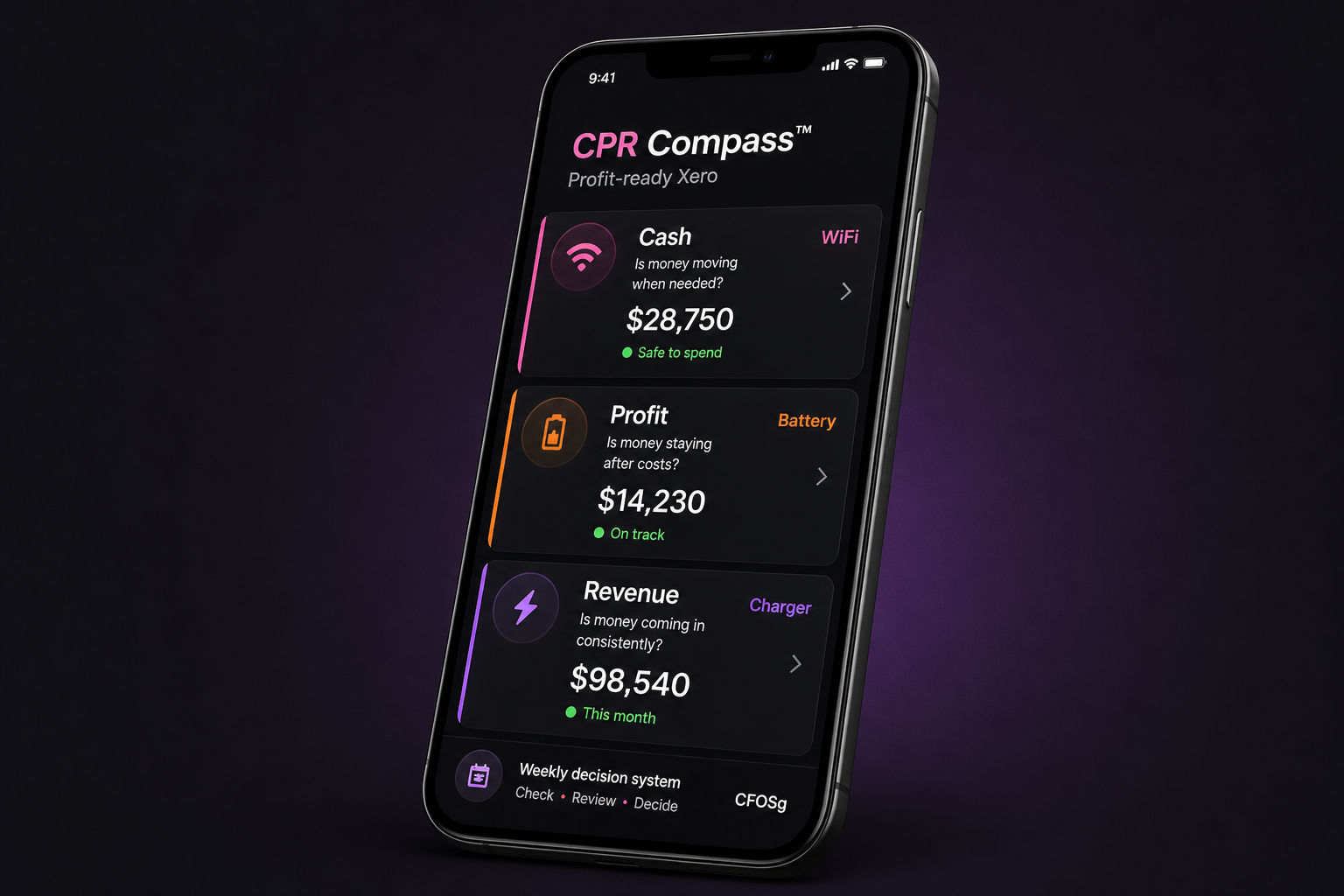
The CPR Compass™
Think of your business like a handphone.
CPR checks whether the 3 essentials are working.
Cash
Is money moving when needed?
Profit
Is money staying after costs?
Revenue
Is money coming in consistently?
More charging will not help if the battery drains fast.
More revenue is not always the answer.
Sometimes the real issue is weak profit or messy cash movement.
CPR checks all 3 before you fix the wrong thing.
Cash is your connection.
The better question is not “how much is in the bank?”
It is “how much of this is actually available?”
- GST
- Payroll
- Supplier bills
- Loans
- Upcoming tax
Bank balance: $80,000
Safe-to-spend may be only $18,000 after payroll, supplier bills, GST and profit allocation.
The money is there. But it may not really be available.
Profit is your battery level.
Revenue can keep charging the business, but profit shows
how much power is actually left after costs.
If the battery keeps draining, more charging
will not fix the real problem.
If profit is not protected, expenses will eat it.
Profit usually disappears quietly through small decisions
that look harmless at the time.
- Extra subscriptions
- Unplanned discounts
- Rushed hiring
- Underpriced jobs
- Small costs nobody reviews
Revenue is your charger.
Revenue brings money in. But the goal is not just more sales.
The goal is enough quality revenue to support the business.
A charger helps only if the business can hold power
and stay connected.
Break-even is the floor. Profit target is the game.
The goal is enough quality revenue to cover costs, protect profit
and reduce cash stress.
More sales can still create more stress
if the numbers are wrong.
Xero can hold the data.
But setup decides if it helps you.
The accounts, tracking, reports, bank setup and routine
decide whether Xero becomes useful.
Without the right setup, Xero becomes
a very nice filing cabinet.
Before: updated accounts, unclear decisions.
After: weekly clarity on cash, profit and revenue.
Before
- Check reports late
- Guess from bank balance
- Profit feels vague
After
- Know safe-to-spend
- Protect profit first
- Track weekly target
DIY Xero setup usually answers
“can I record transactions?”
The better question is “can I make better decisions from this setup?”
Recording is step one. Decision clarity is the bigger win.
Money Day
One short routine. Better decisions.
- Cash: what is safe to spend?
- Profit: what are we keeping?
- Revenue: what must come in?
Action: what needs to change this week?
Check the right few numbers. Not 20 reports.
Keep the routine simple enough to repeat.
- Safe-to-spend cash
- Bills due soon
- Invoices unpaid
- Revenue target
- Profit allocation
Your Xero may not be Profit-Ready if...
- You still rely mainly on bank balance
- You do not know safe-to-spend cash
- You cannot see profit clearly
- You only check reports after month-end
- You feel busy but financially unclear
Want us to check your Xero?
Book a profit-ready™ Xero demo.
We will look at where you are now, what is unclear
and what should be fixed first.
Stop guessing. Turn Xero into a weekly decision system.
Xero is the phone. CPR is the check. Profit-ready Xero is the setup
that helps you make better decisions.
Xero is a trademark of Xero Limited. This masterclass is provided by CFOSg and is not official Xero training.
How to Turn Xero Into a Profit Decision System
Xero is like a smartphone.
Without the right setup, it will not guide better business decisions.
Learn how to use the CPR Compass™ to check cash, profit and revenue.
How to turn Xero into a profit decision system
Stop guessing from your bank balance.
Use the CPR Compass™ to check what you can spend,
protect and grow.
Your bank balance is not your business health.
It is just one number.
And part of that money may already belong to payroll, bills, GST, tax or loans.
Your bank balance can make you feel rich
right before it punches you in the face.
Most businesses use Xero for history. Not decisions.
Invoices, bills, bank feeds, and reports are useful.
But they do not automatically tell you what to do next.
History asks
- What happened?
- What was recorded?
- What does the report say?
Decisions ask
- Can I spend?
- Can I pay myself?
- Do I need more sales?
Xero is like your smartphone.
Profit-ready Xero is the phone setup.
Xero can hold your numbers.
But the setup determines how useful those numbers are for decisions.
Most businesses have the smartphone.
But they are still using it like a calculator.
The CPR Compass™
Think of your business like a handphone.
CPR checks whether the 3 essentials are working.
Cash
Is money moving when needed?
Profit
Is money staying after costs?
Revenue
Is money coming in consistently?
More charging will not help if the battery drains fast.
More revenue is not always the answer.
Sometimes the real issue is weak profit or messy cash movement.
CPR checks all 3 before you fix the wrong thing.
Cash is your connection.
The better question is not “how much is in the bank?”
It is “how much of this is actually available?”
- GST
- Payroll
- Supplier bills
- Loans
- Upcoming tax
Bank balance: $80,000
Safe-to-spend may be only $18,000 after payroll, supplier bills, loans, GST and profit allocation.
The money is there. But it may not really be available.
Profit is your battery level.
Revenue can keep charging the business, but profit shows
how much power is actually left after costs.
If the battery keeps draining, more charging
will not fix the real problem.
If profit is not protected, expenses will eat it.
Profit usually disappears quietly through small decisions
that look harmless at the time.
- Extra subscriptions
- Unplanned discounts
- Rushed hiring
- Underpriced jobs
- Small costs nobody reviews
Revenue is your charger.
Revenue brings money in. But the goal is not just more sales.
The goal is enough quality revenue to support the business.
A charger helps only if the business can hold power
and stay connected.
Break-even is the floor. Profit target is the game.
The goal is enough quality revenue to cover costs, protect profit
and reduce cash stress.
More sales can still create more stress
if the numbers are wrong.
Xero can hold the data.
But setup decides if it helps you.
The accounts, tracking, reports, bank setup, and weekly routine
decide whether Xero becomes useful.
Without the right setup, Xero becomes
a very nice filing cabinet.
Before: updated accounts, unclear decisions.
After: weekly clarity on cash, profit and revenue.
Before
- Check reports late
- Guess from bank balance
- Profit feels vague
After
- Know safe-to-spend
- Protect profit first
- Track weekly target
DIY Xero setup usually answers
“can I record transactions?”
The better question is “can I make better decisions from this setup?”
Recording is step one. Decision clarity is the bigger win.
The weekly Money Day
One short routine. Better decisions.
- Cash: what is safe to spend?
- Profit: what are we keeping?
- Revenue: what must come in?
Action: what needs to change this week?
Check the right few numbers. Not 20 reports.
Keep the routine simple enough to repeat.
- Safe-to-spend cash
- Bills due soon
- Invoices unpaid
- Revenue target
- Profit allocation
Your Xero may not be Profit-Ready if...
- You still rely mainly on bank balance
- You do not know safe-to-spend cash
- You cannot see profit clearly
- You only check reports after month-end
- You feel busy but financially unclear
Want us to check your Xero?
Book a profit-ready™ Xero demo.
We will look at where you are now, what is unclear, and what should be fixed first.
Stop guessing. Turn Xero into a weekly decision system.
Xero is the phone. CPR is the check. Profit-ready Xero is the setup
that helps you make better decisions.
How to Turn Xero Into a Profit Decision System
Xero is like a smartphone.
Without the right setup, it will not guide better business decisions.
Learn how to use the CPR Compass™ to check cash, profit and revenue.
Your 3 money signals
Cash.
Profit.
Revenue.
How to turn Xero into a profit decision system
Stop guessing from your bank balance.
Use the CPR Compass™ to check what you can spend,
protect and grow.
Your bank balance is not your business health.
It is just one number.
And part of that money may already belong to payroll, bills, GST, tax or loans.
Your bank balance can make you feel rich
right before it punches you in the face.
Most businesses use Xero for history. Not decisions.
Invoices, bills, bank feeds, and reports are useful.
But they do not automatically tell you what to do next.
History asks
- What happened?
- What was recorded?
- What does the report say?
Decisions ask
- Can I spend?
- Can I pay myself?
- Do I need more sales?
Xero is like your smartphone.
Profit-ready Xero is the phone setup.
Xero can hold your numbers.
But the setup determines how useful those numbers are for decisions.
Most businesses have the smartphone.
But they are still using it like a calculator.
The CPR Compass™
Think of your business like a handphone.
CPR checks whether the 3 essentials are working.
Cash
Is money moving when needed?
Profit
Is money staying after costs?
Revenue
Is money coming in consistently?
More charging will not help if the battery drains fast.
More revenue is not always the answer.
Sometimes the real issue is weak profit or messy cash movement.
CPR checks all 3 before you fix the wrong thing.
Cash is your connection.
The better question is not “how much is in the bank?”
It is “how much of this is actually available?”
- GST
- Payroll
- Supplier bills
- Loans
- Upcoming tax
Bank balance: $80,000
Safe-to-spend may be only $18,000 after payroll, supplier bills, loans, GST and profit allocation.
The money is there. But it may not really be available.
Profit is your battery level.
Revenue can keep charging the business, but profit shows
how much power is actually left after costs.
If the battery keeps draining, more charging
will not fix the real problem.
If profit is not protected, expenses will eat it.
Profit usually disappears quietly through small decisions
that look harmless at the time.
- Extra subscriptions
- Unplanned discounts
- Rushed hiring
- Underpriced jobs
- Small costs nobody reviews
Revenue is your charger.
Revenue brings money in. But the goal is not just more sales.
The goal is enough quality revenue to support the business.
A charger helps only if the business can hold power
and stay connected.
Break-even is the floor. Profit target is the game.
The goal is enough quality revenue to cover costs, protect profit
and reduce cash stress.
More sales can still create more stress
if the numbers are wrong.
Xero can hold the data.
But setup decides if it helps you.
The accounts, tracking, reports, bank setup, and weekly routine
decide whether Xero becomes useful.
Without the right setup, Xero becomes
a very nice filing cabinet.
Before: updated accounts, unclear decisions.
After: weekly clarity on cash, profit and revenue.
Before
- Check reports late
- Guess from bank balance
- Profit feels vague
After
- Know safe-to-spend
- Protect profit first
- Track weekly target
DIY Xero setup usually answers
“can I record transactions?”
The better question is “can I make better decisions from this setup?”
Recording is step one. Decision clarity is the bigger win.
The weekly Money Day
One short routine. Better decisions.
- Cash: what is safe to spend?
- Profit: what are we keeping?
- Revenue: what must come in?
Action: what needs to change this week?
Check the right few numbers. Not 20 reports.
Keep the routine simple enough to repeat.
- Safe-to-spend cash
- Bills due soon
- Invoices unpaid
- Revenue target
- Profit allocation
Your Xero may not be Profit-Ready if...
- You still rely mainly on bank balance
- You do not know safe-to-spend cash
- You cannot see profit clearly
- You only check reports after month-end
- You feel busy but financially unclear
Want us to check your Xero?
Book a profit-ready™ Xero demo.
We will look at where you are now, what is unclear, and what should be fixed first.
Stop guessing. Turn Xero into a weekly decision system.
Xero is the phone. CPR is the check. Profit-ready Xero is the setup
that helps you make better decisions.
How to Turn Xero Into a Profit Decision System
Xero is like a smartphone.
Without the right setup, it will not guide better business decisions.
Learn how to use the CPR Compass™ to check cash, profit and revenue.
Is your Xero actually profit-ready?
Cash moves.
Profit stays.
Revenue comes in.
How to turn Xero into a profit decision system
Stop guessing from your bank balance.
Use the CPR Compass™ to check what you can spend,
protect and grow.
Your bank balance is not your business health.
It is just one number.
And part of that money may already belong to payroll, bills, GST, tax or loans.
Your bank balance can make you feel rich
right before it punches you in the face.
Most businesses use Xero for history. Not decisions.
Invoices, bills, bank feeds, and reports are useful.
But they do not automatically tell you what to do next.
History asks
- What happened?
- What was recorded?
- What does the report say?
Decisions ask
- Can I spend?
- Can I pay myself?
- Do I need more sales?
Xero is like your smartphone.
Profit-ready Xero is the phone setup.
Xero can hold your numbers.
But the setup determines how useful those numbers are for decisions.
Most businesses have the smartphone.
But they are still using it like a calculator.
The CPR Compass™
Think of your business like a handphone.
CPR checks whether the 3 essentials are working.
Cash
Is money moving when needed?
Profit
Is money staying after costs?
Revenue
Is money coming in consistently?
More charging will not help if the battery drains fast.
More revenue is not always the answer.
Sometimes the real issue is weak profit or messy cash movement.
CPR checks all 3 before you fix the wrong thing.
Cash is your connection.
The better question is not “how much is in the bank?”
It is “how much of this is actually available?”
- GST
- Payroll
- Supplier bills
- Loans
- Upcoming tax
Bank balance: $80,000
Safe-to-spend may be only $18,000 after payroll, supplier bills, loans, GST and profit allocation.
The money is there. But it may not really be available.
Profit is your battery level.
Revenue can keep charging the business, but profit shows
how much power is actually left after costs.
If the battery keeps draining, more charging
will not fix the real problem.
If profit is not protected, expenses will eat it.
Profit usually disappears quietly through small decisions
that look harmless at the time.
- Extra subscriptions
- Unplanned discounts
- Rushed hiring
- Underpriced jobs
- Small costs nobody reviews
Revenue is your charger.
Revenue brings money in. But the goal is not just more sales.
The goal is enough quality revenue to support the business.
A charger helps only if the business can hold power
and stay connected.
Break-even is the floor. Profit target is the game.
The goal is enough quality revenue to cover costs, protect profit
and reduce cash stress.
More sales can still create more stress
if the numbers are wrong.
Xero can hold the data.
But setup decides if it helps you.
The accounts, tracking, reports, bank setup, and weekly routine
decide whether Xero becomes useful.
Without the right setup, Xero becomes
a very nice filing cabinet.
Before: updated accounts, unclear decisions.
After: weekly clarity on cash, profit and revenue.
Before
- Check reports late
- Guess from bank balance
- Profit feels vague
After
- Know safe-to-spend
- Protect profit first
- Track weekly target
DIY Xero setup usually answers
“can I record transactions?”
The better question is “can I make better decisions from this setup?”
Recording is step one. Decision clarity is the bigger win.
The weekly Money Day
One short routine. Better decisions.
- Cash: what is safe to spend?
- Profit: what are we keeping?
- Revenue: what must come in?
Action: what needs to change this week?
Check the right few numbers. Not 20 reports.
Keep the routine simple enough to repeat.
- Safe-to-spend cash
- Bills due soon
- Invoices unpaid
- Revenue target
- Profit allocation
Your Xero may not be Profit-Ready if...
- You still rely mainly on bank balance
- You do not know safe-to-spend cash
- You cannot see profit clearly
- You only check reports after month-end
- You feel busy but financially unclear
Want us to check your Xero?
Book a profit-ready™ Xero demo.
We will look at where you are now, what is unclear, and what should be fixed first.
Stop guessing. Turn Xero into a weekly decision system.
Xero is the phone. CPR is the check. Profit-ready Xero is the setup
that helps you make better decisions.
How to Turn Xero Into a Profit Decision System
Stop guessing from your bank balance.
Learn how to use Xero to make clearer cash, profit and revenue decisions.
How to turn Xero into a profit decision system
Stop guessing from your bank balance.
Use the CPR Compass™ to check what you can spend,
protect and grow.
Your bank balance is not your business health.
It is just one number.
And part of that money may already belong to payroll, bills, GST, tax or loans.
Your bank balance can make you feel rich
right before it punches you in the face.
Most businesses use Xero for history. Not decisions.
Invoices, bills, bank feeds, and reports are useful.
But they do not automatically tell you what to do next.
History asks
- What happened?
- What was recorded?
- What does the report say?
Decisions ask
- Can I spend?
- Can I pay myself?
- Do I need more sales?
Xero is like your smart phone.
Profit-ready Xero is the phone setup.
Xero can hold your numbers.
But the setup determines how useful those numbers are for decisions.
Most businesses have the smart phone.
But they are still using it like a calculator.
The CPR Compass™
Think of your business like a handphone.
CPR checks whether the 3 essentials are working.
Cash
Is money moving when needed?
Profit
Is money staying after costs?
Revenue
Is money coming in consistently?
More charging will not help if the battery drains fast.
More revenue is not always the answer.
Sometimes the real issue is weak profit or messy cash movement.
CPR checks all 3 before you fix the wrong thing.
Cash is your connection.
The better question is not “how much is in the bank?”
It is “how much of this is actually available?”
- GST
- Payroll
- Supplier bills
- Loans
- Upcoming tax
Bank balance: $80,000
Safe-to-spend may be only $18,000 after payroll, supplier bills, loans, GST and profit allocation.
The money is there. But it may not really be available.
Profit is your battery level.
Revenue can keep charging the business, but profit shows
how much power is actually left after costs.
If the battery keeps draining, more charging
will not fix the real problem.
If profit is not protected, expenses will eat it.
Profit usually disappears quietly through small decisions
that look harmless at the time.
- Extra subscriptions
- Unplanned discounts
- Rushed hiring
- Underpriced jobs
- Small costs nobody reviews
Revenue is your charger.
Revenue brings money in. But the goal is not just more sales.
The goal is enough quality revenue to support the business.
A charger helps only if the business can hold power
and stay connected.
Break-even is the floor. Profit target is the game.
The goal is enough quality revenue to cover costs, protect profit
and reduce cash stress.
More sales can still create more stress
if the numbers are wrong.
Xero can hold the data.
But setup decides if it helps you.
The accounts, tracking, reports, bank setup, and weekly routine
decide whether Xero becomes useful.
Without the right setup, Xero becomes
a very nice filing cabinet.
Before: updated accounts, unclear decisions.
After: weekly clarity on cash, profit and revenue.
Before
- Check reports late
- Guess from bank balance
- Profit feels vague
After
- Know safe-to-spend
- Protect profit first
- Track weekly target
DIY Xero setup usually answers
“can I record transactions?”
The better question is “can I make better decisions from this setup?”
Recording is step one. Decision clarity is the bigger win.
The weekly Money Day
One short routine. Better decisions.
- Cash: what is safe to spend?
- Profit: what are we keeping?
- Revenue: what must come in?
Action: what needs to change this week?
Check the right few numbers. Not 20 reports.
Keep the routine simple enough to repeat.
- Safe-to-spend cash
- Bills due soon
- Invoices unpaid
- Revenue target
- Profit allocation
Your Xero may not be Profit-Ready if...
- You still rely mainly on bank balance
- You do not know safe-to-spend cash
- You cannot see profit clearly
- You only check reports after month-end
- You feel busy but financially unclear
Want us to check your Xero?
Book a profit-ready™ Xero demo. We will look at where you are now,
what is unclear, and what should be fixed first.
Stop guessing. Turn Xero into a weekly decision system.
Xero is the phone. CPR is the check. Profit-ready Xero is the setup
that helps you make better decisions.
How to Turn Xero Into a Profit Decision System
Stop guessing from your bank balance.
Learn how to use Xero to make clearer cash, profit, and revenue decisions.
How to turn Xero into a profit decision system
Stop guessing from your bank balance.
Use the CPR Compass™ to check what you can spend, protect, and grow.
Your bank balance is not your business health.
It is just one number. And part of that money may already belong to bills, GST, tax, payroll, loans, or suppliers.
The bank balance can make you feel rich right before it punches you in the face.
Most businesses use Xero for history. Not decisions.
Invoices, bills, bank feeds, and reports are useful. But they do not automatically tell you what to do next.
History asks
- What happened?
- What was recorded?
- What does the report say?
Decisions ask
- Can I spend?
- Can I pay myself?
- Do I need more sales?
Xero is like your smart phone. Profit-ready Xero is the phone setup.
Xero can hold your numbers. But the setup determines
how useful those numbers are for decisions.
Most businesses have the phone.
But they are still using it like a calculator.
The CPR Compass™
Think of your business like a handphone.
CPR checks whether the 3 essentials are working.
Cash
Your WiFi connection.
Is cash moving when needed?
Profit
Your battery level.
Is the business keeping enough power?
Revenue
Your charger.
Is enough money coming in?
More charging will not help if the battery drains fast.
More revenue is not always the answer. Sometimes the real issue is weak profit or messy cash movement.
CPR checks all 3 before you fix the wrong thing.
Cash is your connection.
The better question is not “how much is in the bank?” It is “how much of this is actually available?”
- GST
- Payroll
- Supplier bills
- Loans
- Upcoming tax
Bank balance: $80,000
Safe-to-spend may be only $18,000 after bills, GST, payroll, loans, tax, and profit allocation.
The money is there. But it may not really be available.
Profit is your battery level.
Revenue can keep charging the business, but profit shows how much power is actually left after costs.
If the battery keeps draining, more charging will not fix the real problem.
If profit is not protected, expenses will eat it.
Profit usually disappears quietly through small decisions that look harmless at the time.
- Extra subscriptions
- Unplanned discounts
- Rushed hiring
- Underpriced jobs
- Small costs nobody reviews
Revenue is your charger.
Revenue brings money in. But the goal is not just more sales. The goal is enough quality revenue to support the business.
A charger helps only if the business can hold power and stay connected.
Break-even is the floor. Profit target is the game.
The goal is enough quality revenue to cover costs, protect profit, and reduce cash stress.
More sales can still create more stress if the numbers are wrong.
Xero can hold the data. But setup decides whether it helps you.
The accounts, tracking, reports, bank setup, and weekly routine decide whether Xero becomes useful.
Without the right setup, Xero becomes a very nice filing cabinet.
Before: updated accounts, unclear decisions.
After: weekly clarity on cash, profit, and revenue.
Before
- Check reports late
- Guess from bank balance
- Profit feels vague
After
- Know safe-to-spend
- Protect profit first
- Track weekly target
DIY Xero setup usually answers “can I record transactions?”
The better question is “can I make better decisions from this setup?”
Recording is step one. Decision clarity is the bigger win.
The weekly Money Day
One short routine. Better decisions.
- Cash: what is safe to spend?
- Profit: what are we keeping?
- Revenue: what must come in?
- Action: what needs to change this week?
Check the right few numbers. Not 20 reports.
Keep the routine simple enough to repeat.
- Safe-to-spend cash
- Bills due soon
- Invoices unpaid
- Revenue target
- Profit allocation
Your Xero may not be Profit-Ready if...
- You still rely mainly on bank balance
- You do not know safe-to-spend cash
- You cannot see profit clearly
- You only check reports after month-end
- You feel busy but financially unclear
Want us to check your Xero?
Book a Profit-Ready Xero walkthrough. We will look at where you are now, what is unclear, and what should be fixed first.
Book a walkthroughStop guessing. Turn Xero into a weekly decision system.
Xero is the phone. CPR is the check. Profit-ready xero is the setup that helps you make better cash, profit, and revenue decisions.
Book your Profit-Ready Xero walkthroughHow to Turn Xero Into a Profit Decision System
Stop guessing from your bank balance.
Learn how to use Xero to make clearer cash, profit, and revenue decisions.
How to turn Xero into a profit decision system
Stop guessing from your bank balance.
Use the CPR Compass™ to check what you can spend, protect, and grow.
Your bank balance is not your business health.
It is just one number. And part of that money may already belong to bills, GST, tax, payroll, loans, or suppliers.
The bank balance can make you feel rich right before it punches you in the face.
Most businesses use Xero for history. Not decisions.
Invoices, bills, bank feeds, and reports are useful. But they do not automatically tell you what to do next.
History asks
- What happened?
- What was recorded?
- What does the report say?
Decisions ask
- Can I spend?
- Can I pay myself?
- Do I need more sales?
Clean books do not automatically create clear decisions.
Bookkeeping tells you what happened. A Profit-Ready Xero setup helps you decide what to do next.
Updated accounts are good. Useful accounts are better.
Your Xero is “working” if it records history.
It is “Profit-Ready” if it helps you make better weekly decisions.
The CPR Compass™
A simple way to check business health before making money decisions.
Cash
What can we safely spend?
Profit
What are we actually keeping?
Revenue
What must come in this week?
What can I safely spend?
The better question is not “how much is in the bank?” It is “how much of this is actually available?”
- GST
- Payroll
- Supplier bills
- Loans
- Upcoming tax
Bank balance: $80,000
Safe-to-spend may be only $18,000 after bills, GST, payroll, loans, tax, and profit allocation.
The money is there. But it may not really be available.
What are we protecting?
Profit should not be whatever is left after everyone else has taken a bite.
If profit is treated like leftovers, do not be shocked when it disappears.
If profit is not protected, expenses will eat it.
Profit usually disappears quietly through small decisions that look harmless at the time.
- Extra subscriptions
- Unplanned discounts
- Rushed hiring
- Underpriced jobs
- Small costs nobody reviews
What must we bring in this week?
Do not wait until month-end to know whether revenue was enough. By then, the useful action window may be gone.
Revenue is not just a score. It is a weekly checkpoint.
Break-even is the floor. Profit target is the game.
The goal is not “more sales.” The goal is enough quality revenue to cover costs, protect profit, and reduce cash stress.
More sales can still create more stress if the numbers are wrong.
Xero can hold the data. But setup decides whether it helps you.
The accounts, tracking, reports, bank setup, and weekly routine decide whether Xero becomes useful.
Without the right setup, Xero becomes a very nice filing cabinet.
Before: updated accounts, unclear decisions.
After: weekly clarity on cash, profit, and revenue.
Before
- Check reports late
- Guess from bank balance
- Profit feels vague
After
- Know safe-to-spend
- Protect profit first
- Track weekly target
DIY Xero setup usually answers “can I record transactions?”
The better question is “can I make better decisions from this setup?”
Recording is step one. Decision clarity is the bigger win.
The weekly Money Day
One short routine. Better decisions.
- Cash: what is safe to spend?
- Profit: what are we keeping?
- Revenue: what must come in?
- Action: what needs to change this week?
Check the right few numbers. Not 20 reports.
Keep the routine simple enough to repeat.
- Bank summary
- Bills due
- Invoices unpaid
- Revenue target
- Profit allocation
Your Xero may not be Profit-Ready if...
- You still rely mainly on bank balance
- You do not know safe-to-spend cash
- You cannot see profit clearly
- You only check reports after month-end
- You feel busy but financially unclear
Want us to check your Xero?
Book a Profit-Ready Xero Demo. We will look at where you are now, what is unclear, and what should be fixed first.
Book a demoProfit-Ready Xero walkthrough
For SME owners who want clearer decisions from Xero.
- You want clearer cash visibility
- You want to protect profit better
- You want to stop guessing from bank balance
- You want a practical weekly system
- You want to know what to fix first
Stop guessing. Turn Xero into a weekly decision system.
Cash. Profit. Revenue. Once these 3 numbers are clear, your business becomes easier to manage.
Book your Profit-Ready Xero walkthroughCFOSg Pte. ltd.
More Info
Free masterclass
How to Turn Xero Into a Weekly Profit Decision System
Stop guessing from your bank balance. Learn how to use Cash, Profit, and Revenue checkpoints to see what your business can safely spend, keep, and grow.
Watch the Free MasterclassBonus download
Want the Profit Toolkit too?
Use it after the masterclass to check your cash, profit, and revenue weak spots before booking your demo.
Get the Profit ToolkitFree masterclass for Xero users
How to Turn Xero Into a Weekly Profit Decision System
Stop guessing from your bank balance. Learn how to use Cash, Profit, and Revenue checkpoints to see what your business can safely spend, keep, and grow.
Watch the free masterclass
Enter your details below and you’ll be taken straight to the masterclass page.
You’re in
Watch the Masterclass Below
Learn how to turn Xero into a weekly decision system using Cash, Profit, and Revenue checkpoints.
Start WatchingBonus download
Want the Profit Toolkit too?
Use it after the masterclass to check your cash, profit, and revenue weak spots before booking your demo.
Get the Profit ToolkitWant us to check your Xero setup?
Book a Profit-Ready Xero Demo and we’ll show you where your setup may be helping, hiding, or hurting your cash, profit, and revenue decisions.
Book Your Profit-Ready Xero DemoXero is a trademark of Xero Limited. This masterclass is provided by CFOSg and is not official Xero training.
Choose your pace. Fix your numbers. Stop guessing from your bank balance.
Your Xero setup does not need to feel like one giant accounting headache. This planner breaks the journey into simple steps so you can get your business profit-ready without trying to do everything at once.
Pick the track that fits your real life. Slow and steady is fine. Fast and focused is fine too. The goal is not to rush. The goal is to build a Xero system you can actually use.
Your profit-ready setup covers:
- Income, expenses, and profit accounts
- Bank feeds and clean money flow
- Simple cash control rules
- Protected profit allocation
- Weekly Money Day routine
Pick your setup track
No guilt. No drama. Just choose the pace that makes sense for your schedule.
15-minute money moves
Best for busy ownersUse this if your calendar is already packed and you want small, easy steps without feeling buried in numbers.
Weekly profit sprint
Best for steady progressUse this if you can block one focused session each week to review, decide, and clean up your money flow.
Setup weekend
Best for fast actionUse this if you want to clear the setup quickly and get your Xero profit system moving in one focused push.
The profit-ready xero launch checklist
Follow these steps in the track that suits you. Each step helps turn Xero from a bookkeeping tool into a weekly decision system.
Set your money goal
- Choose your main issue: cash, profit, or revenue
- Decide what you want to see clearly every week
- List the money questions you keep avoiding
Clean up the money flow
- Check bank accounts and feeds
- Separate income, expenses, and profit
- Remove messy or confusing money movement
Create cash control
- Know what is safe to spend
- Stop judging cash from one bank balance
- Set a simple weekly cash check
Protect profit first
- Decide your first profit allocation
- Move profit before it disappears
- Build the habit before increasing the amount
Check revenue reality
- Know your break-even point
- Set a weekly revenue checkpoint
- Spot whether sales are actually enough
Start your Money Day routine
- Review cash, profit, and revenue weekly
- Choose one action for the week
- Stop letting the bank balance boss you around
You are profit-ready when...
You know what money is safe to spend, what profit is protected, and what revenue target keeps the business moving.
Xero should not just tell you what happened. It should help you decide what to do next.
Track 1: 15-minute money moves
Best for busy business owners who keep avoiding their numbers.
Daily setup plan
- Day 1: Choose your biggest money issue: cash, profit, or revenue
- Day 2: Check that all bank feeds are connected
- Day 3: Review income account
- Day 4: Review expense account
- Day 5: Create or confirm profit account
- Day 6: Check unpaid customer invoices
- Day 7: Check unpaid supplier bills
- Day 8: Spot 3 expenses to review
- Day 9: Decide your first profit transfer amount
- Day 10: Set your weekly Money Day routine
- Day 11: Review your break-even target
- Day 12: Review your weekly revenue target
- Day 13: Set one cash rule
- Day 14: Set one profit rule
- Day 15: Do your final profit-ready check
Track 2: Weekly profit sprint
Best for clients who can block one focused session each week.
Week 1: Money snapshot
- Pick cash, profit, or revenue as your main issue
- Review all bank accounts
- Check bank feeds
- Spot messy or confusing areas
Week 2: Cash control
- Review income and expense flow
- Check unpaid customer invoices
- Check unpaid supplier bills
- Decide what is safe to spend
Week 3: Profit protection
- Set up or confirm your profit account
- Decide your first profit allocation
- Review expenses
- Pick one profit leak to fix
Week 4: Revenue reality
- Check your break-even point
- Set your weekly revenue target
- Review your top customers or services
- Start your weekly Money Day routine
Track 3: Setup weekend
Best for clients who want to clear the setup fast.
Session 1: Fix the money flow
- Confirm all bank accounts
- Connect bank feeds
- Separate income, expenses, and profit
- Review unpaid invoices and bills
- Spot messy transactions or confusing money movement
Session 2: Build the decision system
- Set one cash control rule
- Set your first profit allocation
- Set your break-even target
- Set your weekly revenue target
- Start your weekly Money Day routine
Choose your pace. Fix your numbers. Stop guessing from your bank balance.
Your Xero setup does not need to feel like one giant accounting headache. This planner breaks the journey into simple steps so you can get your business profit-ready without trying to do everything at once.
Pick the track that fits your real life. Slow and steady is fine. Fast and focused is fine too. The goal is not to rush. The goal is to build a Xero system you can actually use.
Your profit-ready setup covers:
- Income, expenses, and profit accounts
- Bank feeds and clean money flow
- Simple cash control rules
- Protected profit allocation
- Weekly Money Day routine
Pick your setup track
No guilt. No drama. Just choose the pace that makes sense for your schedule.
15-minute money moves
Best for busy ownersUse this if your calendar is already packed and you want small, easy steps without feeling buried in numbers.
View track 1Weekly profit sprint
Best for steady progressUse this if you can block one focused session each week to review, decide, and clean up your money flow.
View track 2Setup weekend
Best for fast actionUse this if you want to clear the setup quickly and get your Xero profit system moving in one focused push.
View track 3Track 1: 15-minute money moves
Best for busy business owners who keep avoiding their numbers. Small steps. Less panic. Fewer “I’ll do it later” lies.
Daily setup plan
- Day 1: Choose your biggest money issue: cash, profit, or revenue
- Day 2: Check that all bank feeds are connected
- Day 3: Review income account
- Day 4: Review expense account
- Day 5: Create or confirm profit account
- Day 6: Check unpaid customer invoices
- Day 7: Check unpaid supplier bills
- Day 8: Spot 3 expenses to review
- Day 9: Decide your first profit transfer amount
- Day 10: Set your weekly Money Day routine
- Day 11: Review your break-even target
- Day 12: Review your weekly revenue target
- Day 13: Set one cash rule
- Day 14: Set one profit rule
- Day 15: Do your final profit-ready check
Track 2: Weekly profit sprint
Best for clients who can block one focused session each week. This gives you steady progress without turning your whole week into spreadsheet soup.
Week 1: Money snapshot
- Pick cash, profit, or revenue as your main issue
- Review all bank accounts
- Check bank feeds
- Spot messy or confusing areas
Week 2: Cash control
- Review income and expense flow
- Check unpaid customer invoices
- Check unpaid supplier bills
- Decide what is safe to spend
Week 3: Profit protection
- Set up or confirm your profit account
- Decide your first profit allocation
- Review expenses
- Pick one profit leak to fix
Week 4: Revenue reality
- Check your break-even point
- Set your weekly revenue target
- Review your top customers or services
- Start your weekly Money Day routine
Track 3: Setup weekend
Best for clients who want to clear the setup fast. Block the time, fix the mess, and stop letting Xero collect digital dust.
Session 1: Fix the money flow
- Confirm all bank accounts
- Connect bank feeds
- Separate income, expenses, and profit
- Review unpaid invoices and bills
- Spot messy transactions or confusing money movement
Session 2: Build the decision system
- Set one cash control rule
- Set your first profit allocation
- Set your break-even target
- Set your weekly revenue target
- Start your weekly Money Day routine
The profit-ready xero launch checklist
Follow these steps in the track that suits you. Each step helps turn Xero from a bookkeeping tool into a weekly decision system.
Set your money goal
- Choose your main issue: cash, profit, or revenue
- Decide what you want to see clearly every week
- List the money questions you keep avoiding
Clean up the money flow
- Check bank accounts and feeds
- Separate income, expenses, and profit
- Remove messy or confusing money movement
Create cash control
- Know what is safe to spend
- Stop judging cash from one bank balance
- Set a simple weekly cash check
Protect profit first
- Decide your first profit allocation
- Move profit before it disappears
- Build the habit before increasing the amount
Check revenue reality
- Know your break-even point
- Set a weekly revenue checkpoint
- Spot whether sales are actually enough
Start your Money Day routine
- Review cash, profit, and revenue weekly
- Choose one action for the week
- Stop letting the bank balance boss you around
You are profit-ready when...
You know what money is safe to spend, what profit is protected, and what revenue target keeps the business moving.
Xero should not just tell you what happened. It should help you decide what to do next.
Start where the leak is loudest.
Every business needs clearer numbers. But not every business needs the same level of support right now.
Some owners need cash clarity. Some need a full Profit-ready Xero setup. Some need ongoing CFO support for revenue, pricing, and growth decisions.
Fix cash
S$2,997 / 1 monthFor owners who need fast cash clarity and want to stop guessing what they can safely spend.
- See where cash is stuck
- Spot the biggest cash leaks
- Know what needs to be held back
- Leave with a simple cash control plan
Profit-ready Xero
S$6,997 / 3 monthsFor owners who want Xero to become a weekly decision system for cash, profit, and revenue.
- Set up clearer cash visibility
- Build profit protection into the system
- Know your revenue target
- Create a weekly Money Day routine
CFO revenue support
S$5,000 / monthFor owners who want ongoing CFO support for revenue, pricing, targets, and growth decisions.
- Review revenue performance
- Set clearer targets
- Improve pricing decisions
- Get monthly strategic guidance
Not sure where to start?
Start with the problem that feels most painful now: cash confusion, profit leakage, or revenue uncertainty. We can help you choose the right path during the first conversation.
Profit-ready xero launch planner
Your numbers should help you make better decisions, not make you feel like you need a finance degree and a strong coffee.
This planner helps you choose the right starting point based on what is hurting most right now: cash confusion, profit leakage, or revenue uncertainty.
Choose your starting point
You do not need to fix everything at once. Start where the leak is loudest.
Fix cash
S$2,997 / 1 monthFor owners who need fast cash clarity.
- You keep checking the bank balance
- You are not sure what is safe to spend
- Cash comes in but disappears
Profit-ready Xero
S$6,997 / 3 monthsFor owners who want Xero to become a weekly decision system.
- You want cash, profit, and revenue clarity
- Xero exists but does not guide decisions
- You want a stronger financial routine
CFO revenue support
S$5,000 / monthFor owners who want ongoing CFO guidance.
- You need help with targets
- You want better pricing decisions
- You want monthly strategic review
Fix cash: 1-month planner
Best if your main question is: “Can I afford this?”
Cash snapshot
- Review where cash is sitting now
- Identify what money is already spoken for
- Spot the biggest cash confusion points
Cash leak review
- Review recurring costs
- Spot payments that need attention
- Find where cash quietly disappears
Safe-to-spend rule
- Decide what must be held back
- Create a simple spending boundary
- Reduce bank-balance guessing
Cash control plan
- Set your weekly cash check
- Choose one cash action to repeat
- Leave with a clearer cash routine
Profit-ready Xero: 3-month planner
Best if you want Xero to guide cash, profit, and revenue decisions every week.
Cash control
- Review your current money flow
- Set clearer cash visibility
- Build your safe-to-spend view
- Create your first Money Day check
Profit protection
- Identify profit leaks
- Create a simple profit habit
- Review expenses with purpose
- Stop letting profit vanish silently
Revenue reality
- Review your break-even point
- Set a clearer revenue target
- Connect revenue to weekly decisions
- Finalise your Money Day routine
CFO revenue support: monthly routine
Best if you want ongoing financial thinking, not just a one-time setup.
Revenue review
- Review revenue performance
- Compare actual results against target
- Spot where revenue is weak or uneven
Pricing and margin review
- Review pricing pressure
- Check margin impact
- Identify offers that may need adjustment
Target and pipeline check
- Review what revenue needs to come in
- Check sales pipeline or upcoming work
- Decide where attention is needed
Decision and action plan
- Agree the next best actions
- Review key financial decisions
- Set focus for the next month
Before we start, prepare these
Access and documents
- Xero access
- Bank account list
- Latest management reports, if available
- Any current budgets or targets
Business questions
- What feels messy right now?
- What decision do you keep delaying?
- What do you want to know every week?
- What would make you feel more in control?
Weekly Money Day checklist
Once your system is in place, this is the simple weekly routine.
What is safe to spend?
- Check cash position
- Check what must be held back
- Choose one cash action
What are we keeping?
- Check profit allocation
- Review one profit leak
- Protect profit before it disappears
What needs to come in?
- Check revenue target
- Review sales gap
- Choose one revenue action
You are profit-ready when...
You know what money is safe to spend, what profit needs to be protected, and what revenue target keeps the business moving.
Xero should not just tell you what happened. It should help you decide what to do next.