Safe-to-spend

5–7 min read

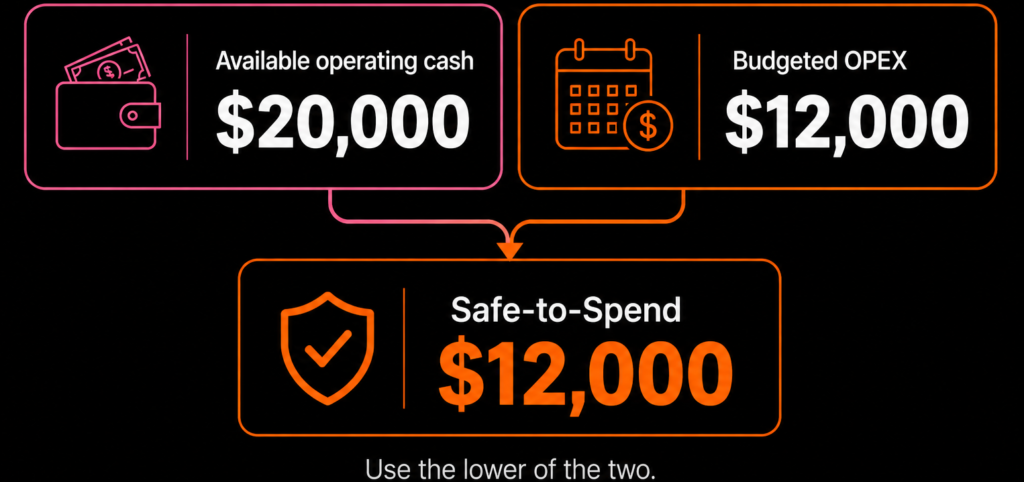
Safe-to-Spend calculation comparing budgeted operating expenses with available cash

Share This Post

Profit-Ready™ money guide

Why Safe-to-Spend Uses the Lower Number

Your budget is only one side of the decision. Safe-to-Spend also checks the cash actually available, so you do not spend more than the business can comfortably support.

How does Safe-to-Spend work?

Your Safe-to-Spend amount is the lower of:

1. Budgeted operating expenses
What you planned
2. Available operating cash
What you can afford
Safe-to-Spend = the lower of the two

What if you have more cash than your budget?

Imagine you have $20,000 of operating cash available. That does not automatically mean your business should spend $20,000.

If your operating budget is only $12,000, the extra cash does not become permission to spend more. Your budget is still the spending guardrail.

Available operating cash: $20,000
Budgeted OPEX: $12,000
Safe-to-Spend: $12,000

What if your available cash is lower than your budget?

Now suppose your operating budget is $20,000, but only $12,000 of operating cash is actually available.

In that case, the budget does not override the cash reality. Spending the full $20,000 could put unnecessary pressure on cash flow.

Budgeted OPEX: $20,000
Available operating cash: $12,000
Safe-to-Spend: $12,000

Why your bank balance is not your Safe-to-Spend number

Money in the bank may already be needed for payroll, suppliers, tax, loan repayments, planned profit or other commitments.

That is why looking only at your bank balance can make a business feel like it has more spending power than it really does.

The question is not:
“How much cash do I have?”
The better question is:
“How much is actually safe to spend?”

Make Safe-to-Spend part of your monthly routine

Before making new spending decisions, compare your available operating cash against your planned operating expenses.

Whichever number is lower becomes your Safe-to-Spend limit.

Your simple Safe-to-Spend check

1. Check your available operating cash.
2. Check your budgeted operating expenses.
3. Compare the two numbers.
4. Use the lower amount as your Safe-to-Spend limit.
5. Review again before making a major spending commitment.

Safe-to-Spend is one part of the Profit-Ready Xero decision system , designed to help business owners turn accounting numbers into practical decisions.

Know what is safe to spend before you spend it.

Use the Safe-to-Spend calculator to compare your budget with the cash actually available to your business.

Calculate My Safe-to-Spend
Next steps
Not sure why profit and cash do not match? Start with the checkup.
Take the Cash vs Profit Checkup Book demo
Profit-Ready Xero See how Xero becomes a decision system
Next steps
Not sure why profit and cash do not match? Start with the checkup.
Take the Cash vs Profit Checkup Book demo
Profit-Ready Xero See how Xero becomes a decision system
Want more practical money guides? Read the CFOSg Blog
Next Steps
Take the Profit Quiz Book a Call
Profit-Ready™ for Xero users See grant support details
Want weekly CFO tips? Get Money Monday in your inbox
For current Xero users

Profit-Ready™ for Xero users

Already on Xero but still not clear on cash, profit, or what to fix first? This setup helps turn your numbers into something more usable, so you can stop guessing and make better weekly decisions.

What this helps with
1
Stop reading your bank balance like a fortune cookie.
Get a clearer view of cash, profit, and revenue without adding more confusion.
2
Make Xero more useful week to week.
Add a simpler rhythm so your numbers support decisions instead of just recording history.
3
Know what to do next.
See what the setup includes, how support works, and whether it fits where your business is now.
Next steps
1
View the main solution page
2
See support details and what is included
3
Book a call if you want help choosing the right next move

Replace the links above with your actual solution page and booking page.

get Money Monday weekly
Profit-Ready tips. 5–7 min read. Unsubscribe anytime.

Stay in the loop (non-clients)

Notify me when it drops
1 click to unsubscribe anytime.

More to explore:

More to explore: