Is Your Xero Profit-Ready?
Is your Xero profit-ready? Take the quick check
Free Xero profit-readiness check

Is your Xero profit-ready?

Your Xero may be updated, reconciled, and still not helping you make better money decisions.

Check the 3 warning signs most business owners miss.

Check my Xero warning signs
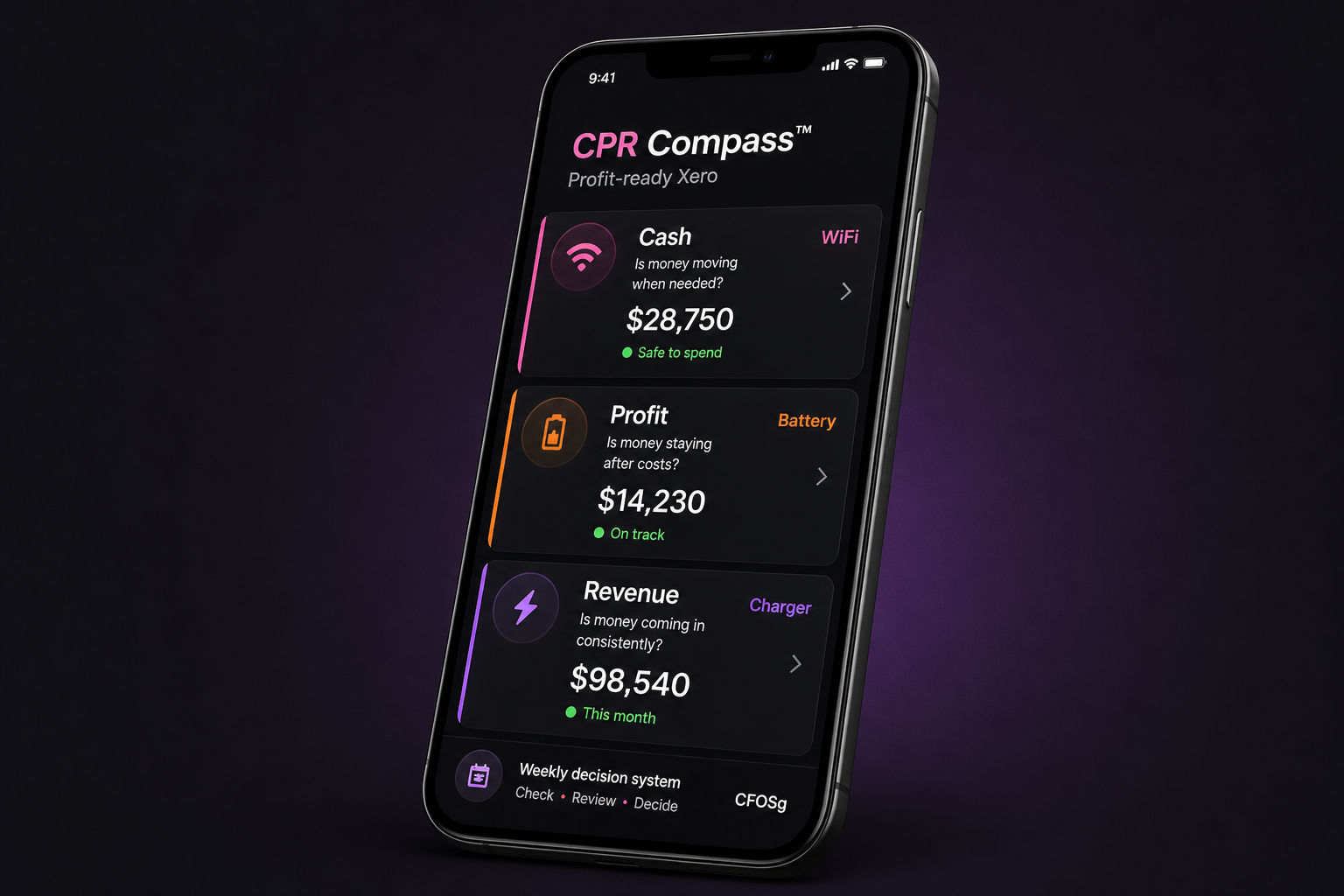
Phone mockup showing CPR Compass cash profit and revenue dashboard
Free Xero profit-readiness check

Is your Xero profit-ready?

Your Xero may be updated, reconciled, and still not helping you make better cash, profit, and revenue decisions.

CFOSg 1 / 11
The painful truth

Your bank balance can lie.

That money may already belong to bills, payroll, GST, tax, or supplier payments.

The money is there.

But it may not be safe to spend.

Cash is not the same as clarity 2 / 11
The real problem

Updated accounts are good. Useful accounts are better.

Most businesses use Xero to record what happened. But owners need to know what to do next.

Can I spend?

Can I pay myself?

Do I need more sales?

Reports are not the same as decisions 3 / 11
Warning sign 1

You do not know your safe-to-spend cash.

You may see cash in the bank, but still not know how much is actually available after upcoming commitments.

This is where accidental overspending starts.

Bank balance is not your spending guide 4 / 11
Warning sign 2

You do not know what profit to protect.

If profit is not protected first, expenses usually find a way to eat it.

Profit disappears quietly before owners notice.

Profit needs a system, not hope 5 / 11
Warning sign 3

You do not know your revenue floor.

More sales are not always the answer. You need to know the minimum revenue needed to cover costs and protect profit.

Busy sales can still create cash stress.

Revenue must be useful, not just active 6 / 11
Quick reality check

Can your Xero answer this without digging?

Score cash, profit and revenue separately. Then add the 3 scores.

0

No idea

I would need to guess or ask someone.

1

Needs digging

The answer is there, but not easy to see.

2

Clear answer

I can decide quickly without guessing.

0–2 Mostly guessing
3–4 Partial clarity
5–6 Close to profit-ready
Cash score + profit score + revenue score = your total 7 / 11
The simple check

The CPR Compass™

A simple way to check whether your Xero is helping you make weekly money decisions.

Cash

What can I spend?

Profit

What should stay?

Revenue

What must come in?

Cash moves. Profit stays. Revenue comes in. 8 / 11
Check your Xero

Your Xero may not be profit-ready if...

  • You still rely mainly on bank balance
  • You do not know safe-to-spend cash
  • You only check reports after month-end
  • Profit feels unclear
  • Sales look active but cash still feels tight
The problem may be the setup, not your effort 9 / 11
What we check

In the demo, we check what your Xero is not showing clearly.

We look for the gaps that make cash, profit and revenue decisions harder than they should be.

Cash

Safe-to-spend?

Profit

Protected?

Revenue

Enough coming in?

You leave knowing what should be fixed first 10 / 11
Final step

Stop guessing from your bank balance.

Turn Xero into a weekly decision system for cash, profit, and revenue.

Book your Profit-Ready Xero demo
CFOSg 11 / 11
Is Your Xero Profit-Ready?
Is your Xero profit-ready? Take the quick check
Free Xero profit-readiness check

Is your Xero profit-ready?

Your Xero may be updated, reconciled, and still not helping you make better money decisions.

Check the 3 warning signs most business owners miss.

Check my Xero warning signs
Phone mockup showing CPR Compass cash profit and revenue dashboard
Free Xero profit-readiness check

Is your Xero profit-ready?

Your Xero may be updated, reconciled, and still not helping you make better cash, profit, and revenue decisions.

CFOSg 1 / 11
The painful truth

Your bank balance can lie.

That money may already belong to bills, payroll, GST, tax, or supplier payments.

The money is there.

But it may not be safe to spend.

Cash is not the same as clarity 2 / 11
The real problem

Updated accounts are good. Useful accounts are better.

Most businesses use Xero to record what happened. But owners need to know what to do next.

Can I spend?

Can I pay myself?

Do I need more sales?

Reports are not the same as decisions 3 / 11
Warning sign 1

You do not know your safe-to-spend cash.

You may see cash in the bank, but still not know how much is actually available after upcoming commitments.

This is where accidental overspending starts.

Bank balance is not your spending guide 4 / 11
Warning sign 2

You do not know what profit to protect.

If profit is not protected first, expenses usually find a way to eat it.

Profit disappears quietly before owners notice.

Profit needs a system, not hope 5 / 11
Warning sign 3

You do not know your revenue floor.

More sales are not always the answer. You need to know the minimum revenue needed to cover costs and protect profit.

Busy sales can still create cash stress.

Revenue must be useful, not just active 6 / 11
Quick reality check

Can your Xero answer this without digging?

Score cash, profit and revenue separately. Then add the 3 scores.

0

No idea

I would need to guess or ask someone.

1

Needs digging

The answer is there, but not easy to see.

2

Clear answer

I can decide quickly without guessing.

0–2 Mostly guessing
3–4 Partial clarity
5–6 Close to profit-ready
Cash score + profit score + revenue score = your total 7 / 11
The simple check

The CPR Compass™

A simple way to check whether your Xero is helping you make weekly money decisions.

Cash

What can I spend?

Profit

What should stay?

Revenue

What must come in?

Cash moves. Profit stays. Revenue comes in. 8 / 11
Check your Xero

Your Xero may not be profit-ready if...

  • You still rely mainly on bank balance
  • You do not know safe-to-spend cash
  • You only check reports after month-end
  • Profit feels unclear
  • Sales look active but cash still feels tight
The problem may be the setup, not your effort 9 / 11
What we check

In the demo, we check what your Xero is not showing clearly.

We look for the gaps that make cash, profit and revenue decisions harder than they should be.

Cash

Safe-to-spend?

Profit

Protected?

Revenue

Enough coming in?

You leave knowing what should be fixed first 10 / 11
Final step

Stop guessing from your bank balance.

Turn Xero into a weekly decision system for cash, profit, and revenue.

Book your Profit-Ready Xero demo
CFOSg 11 / 11
Quick checklist

Score your Xero profit-readiness

Score each area from 0 to 2. Then add the 3 scores.

Cash check

Can I quickly see what cash is safe to spend?

0 1 2

Profit check

Can I quickly see what profit should be protected?

0 1 2

Revenue check

Can I quickly see whether enough revenue is coming in?

0 1 2

Your total score

Cash + profit + revenue = ______ / 6

0–2

Mostly guessing

3–4

Partial clarity

5–6

Close to profit-ready

Not happy with your score?

Book a Profit-Ready Xero demo and we will check what your Xero is not showing clearly.

Book a Profit-Ready Xero demo
Quick cheatsheet

What Xero shows vs. what you still need to know

Xero can show what happened. But owners still need to know what to do next.

Area
Xero may show you
What it may not tell you clearly
Cash
Bank balance, bills, invoices
What is actually safe to spend
Profit
Profit and loss report
What profit should be protected before spending
Revenue
Sales, invoices, debtors
Whether collected revenue is enough
Bills
Payables report
Which payments may create cash pressure
Invoices
Unpaid invoice list
Whether slow collection is hiding a cash problem
Expenses
Expense categories
Which costs are quietly eating profit
Owner pay
Salary or drawings entries
Whether owner pay is sustainable
Growth
Sales trend
Whether growth is creating more cash stress

If your Xero shows reports but not clear decisions, it may not be profit-ready.

Book a Profit-Ready Xero demo and we will check what your Xero is not showing clearly.

Book a Profit-Ready Xero demo
Is Your Xero Profit-Ready?
Is your Xero profit-ready? Take the quick check
Free Xero profit-readiness check

Is your Xero profit-ready?

Your Xero may be updated, reconciled, and still not helping you make better money decisions.

Check the 3 warning signs most business owners miss.

Check my Xero warning signs
Phone mockup showing CPR Compass cash profit and revenue dashboard
Free Xero profit-readiness check

Is your Xero profit-ready?

Your Xero may be updated, reconciled, and still not helping you make better cash, profit, and revenue decisions.

CFOSg 1 / 11
The painful truth

Your bank balance can lie.

That money may already belong to bills, payroll, GST, tax, or supplier payments.

The money is there.

But it may not be safe to spend.

Cash is not the same as clarity 2 / 11
The real problem

Updated accounts are good. Useful accounts are better.

Most businesses use Xero to record what happened. But owners need to know what to do next.

Can I spend?

Can I pay myself?

Do I need more sales?

Reports are not the same as decisions 3 / 11
Warning sign 1

You do not know your safe-to-spend cash.

You may see cash in the bank, but still not know how much is actually available after upcoming commitments.

This is where accidental overspending starts.

Bank balance is not your spending guide 4 / 11
Warning sign 2

You do not know what profit to protect.

If profit is not protected first, expenses usually find a way to eat it.

Profit disappears quietly before owners notice.

Profit needs a system, not hope 5 / 11
Warning sign 3

You do not know your revenue floor.

More sales are not always the answer. You need to know the minimum revenue needed to cover costs and protect profit.

Busy sales can still create cash stress.

Revenue must be useful, not just active 6 / 11
Quick reality check

Can your Xero answer this without digging?

Score cash, profit and revenue separately. Then add the 3 scores.

0

No idea

I would need to guess or ask someone.

1

Needs digging

The answer is there, but not easy to see.

2

Clear answer

I can decide quickly without guessing.

0–2 Mostly guessing
3–4 Partial clarity
5–6 Close to profit-ready
Cash score + profit score + revenue score = your total 7 / 11
The simple check

The CPR Compass™

A simple way to check whether your Xero is helping you make weekly money decisions.

Cash

What can I spend?

Profit

What should stay?

Revenue

What must come in?

Cash moves. Profit stays. Revenue comes in. 8 / 11
Check your Xero

Your Xero may not be profit-ready if...

  • You still rely mainly on bank balance
  • You do not know safe-to-spend cash
  • You only check reports after month-end
  • Profit feels unclear
  • Sales look active but cash still feels tight
The problem may be the setup, not your effort 9 / 11
What we check

In the demo, we check what your Xero is not showing clearly.

We look for the gaps that make cash, profit and revenue decisions harder than they should be.

Cash

Safe-to-spend?

Profit

Protected?

Revenue

Enough coming in?

You leave knowing what should be fixed first 10 / 11
Final step

Stop guessing from your bank balance.

Turn Xero into a weekly decision system for cash, profit, and revenue.

Book your Profit-Ready Xero demo
CFOSg 11 / 11
Quick cheatsheet

What Xero shows vs. what you still need to know

Xero can show what happened. But owners still need to know what to do next.

Area
Xero may show you
What it may not tell you clearly
Cash
Bank balance, bills, invoices
What is actually safe to spend
Profit
Profit and loss report
What profit should be protected before spending
Revenue
Sales, invoices, debtors
Whether collected revenue is enough
Bills
Payables report
Which payments may create cash pressure
Invoices
Unpaid invoice list
Whether slow collection is hiding a cash problem
Expenses
Expense categories
Which costs are quietly eating profit
Owner pay
Salary or drawings entries
Whether owner pay is sustainable
Growth
Sales trend
Whether growth is creating more cash stress

If your Xero shows reports but not clear decisions, it may not be profit-ready.

Book a Profit-Ready Xero demo and we will check what your Xero is not showing clearly.

Book a Profit-Ready Xero demo